While I was shopping for some new tech accessories, I decided I would try an Apple Pencil and see how they fare as a stylus and occasional digital handwriting/drawing tool. Spoiler alert, they're a not an awful value in terms of what they all offer. However, the buying process for Apple Pencils is much more confusing than it may sound on the surface.
Apple Pencil (1st generation)
This is the original product. It has pressure sensitivity and tilt detection, and is usually cheaper because of its age. Also, it charges with a lightning connector.
No, not a cable. You stick it directly into the lightning port of your iPad to both pair it and charge it. iPad doesn't have a lightning port? You better hope it came with the tiny adapter piece that allows you to connect a USB-C cable to it. iPad lightning port broken? You best hope it came with the tiny lightning coupler so you can charge it. Good luck pairing it.
Also, the cap is fully removable and easily lost.
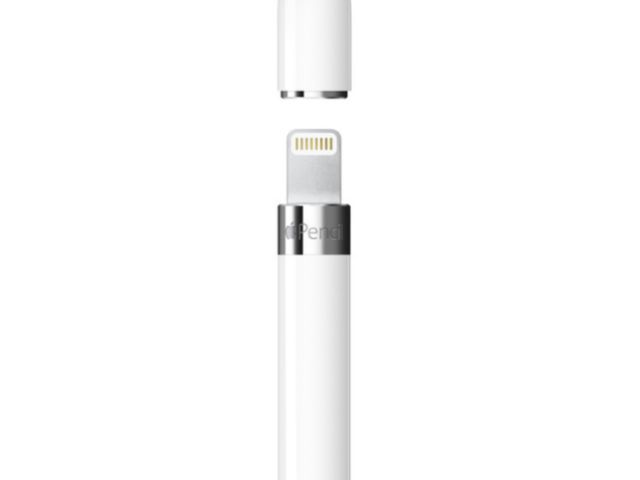
The USB-C adapter and lightning coupler are packed-in in newer release cycles (mine came with both in-box) and are shown on the box if it contains them, but if you can't find one that comes with them, the USB-C adapter costs $10 USD.
Otherwise it's the best value and most widely compatible option.
Apple Pencil (2nd generation)
This one fixed all of the flaws from the 1st gen. Sort of.
Instead of plugging into anything, it uses wireless charging. Not Qi, but some bespoke version that available on the side of iPad Air and iPad Pro models. There are no other ways to charge it.
This pencil is, confusingly, not compatible with the standard iPad lineup, which made it a non-starter for me because there's no way I was going to shell out extra for a kneecapped touchscreen Macbook with worse battery life and no keyboard.
Apple Pencil (USB-C)
This one is just like the 2nd generation pencil, except the cap pulls back (but doesn't come off) to reveal a USB-C port. Also, it works with mainline iPads. Finally, they figured out how to make a good chargable stylus design!
Oh, but it doesn't have pressure sensitivity. Just tilt detection (??? why?), so it's objectively a worse stylus than every other model.
Apple Pencil Pro
This is basically the 2nd generation pencil but longer, and it has a pinch gesture you can perform (similar to the stem actions on AirPods, including haptic feedback) to trigger a generally configurable action. Similar to the 2nd gen pencil, this doesn't work on the mainline iPad lineup, so I didn't get this one.
My purchase
I ended up buying the first generation Pencil so that I have the pressure sensitivity. The pencil doesn't magnet to the side of my iPad like the other models do, and I have to use a chain of adapters (power -> usb c, usb c -> pencil adapter, pencil adapter -> pencil) to charge it, but it lasts a week between charges and works really well as a stylus and handwriting tool so /shrug.
I didn't explore any non-Apple solutions because my initial research showed that they were either more expensive, or had drawbacks that made me not want to try them.